

Production & Planning
The shop floor logged in real time, with capacity and delivery dates.
See the system with my own data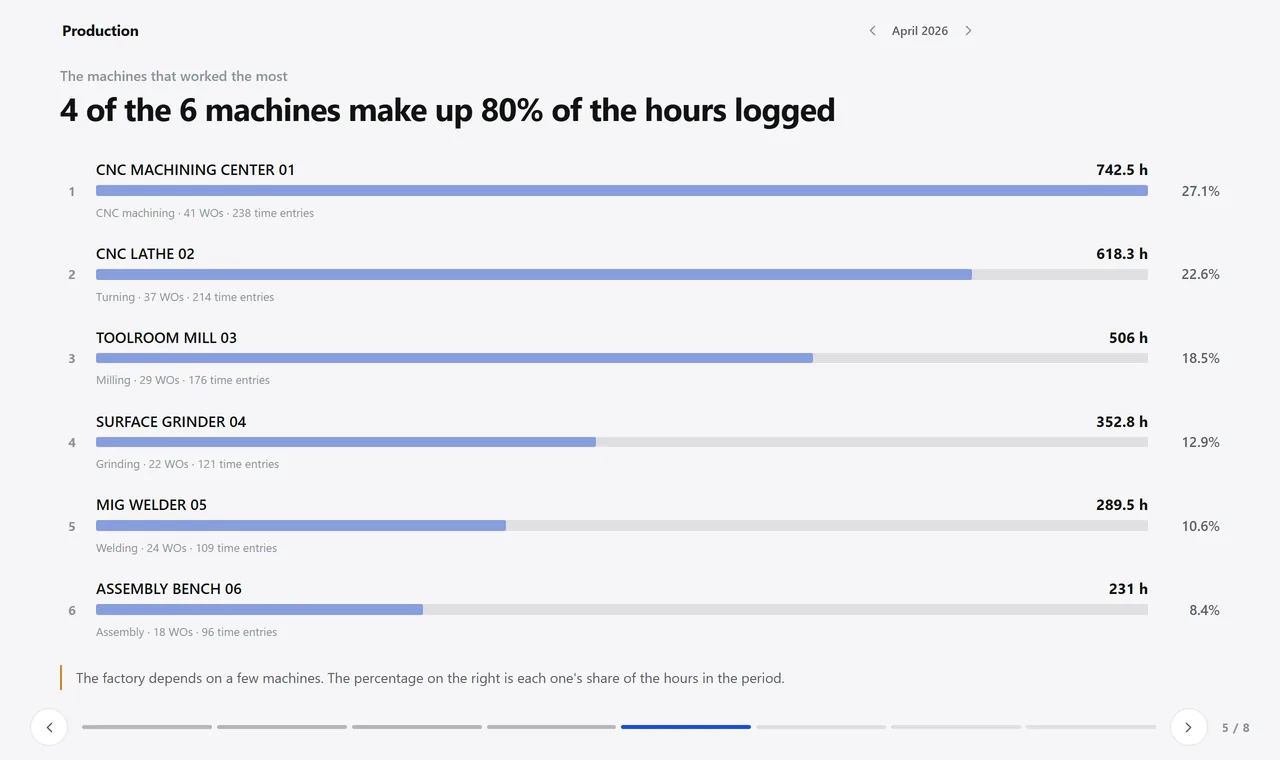
The machines that worked the most this month. A real system screen, with sample data. The screens are in Portuguese today. Scroll sideways to see the whole screen.
How it usually works
Production is written on a sheet of paper taped to the machine
The week’s plan lives on a whiteboard; a rush order came in, and the whiteboard got wiped.
The customer sends the delivery schedule in a spreadsheet and someone retypes the dates — one wrong line turns into a penalty.
With the module
The shop floor logs its own work, with big buttons
- Four taps and the log entry is open
- Stopped? Log the reason
- When closing, enter good parts and scrap
- Production planning reads the real capacity
What the plant records
At the machine
- Quick logging on a touchscreen, with big buttons
- Full logging with date, time, good parts and scrap
- Downtime logging with reason, start and end
- Opening the order’s drawing by scanning a code on the shop floor
In planning
- Load by machine and by employee, week by week
- Splitting each item between making, buying, using stock or reworking
- Delivery schedule imported from the customer’s file, without retyping
- Daily delivery planning by customer
In analysis
- Efficiency by employee, with your company’s target marked
- Capacity utilization by machine group
- Downtime by reason, in decimal hours
- Nonconformances for the period by type of corrective action
Talks to Projects, Purchasing, Inventory, Quality, and Sales.
How much of your capacity was actually used last month?
See the system with my own dataA reply by email within one business day, from a person on our sales team — not a bot.