
Sales & Orders

From order entry to invoicing, with the whole order backlog in view.

See the system with my own data
Develop · Sales · Kanban
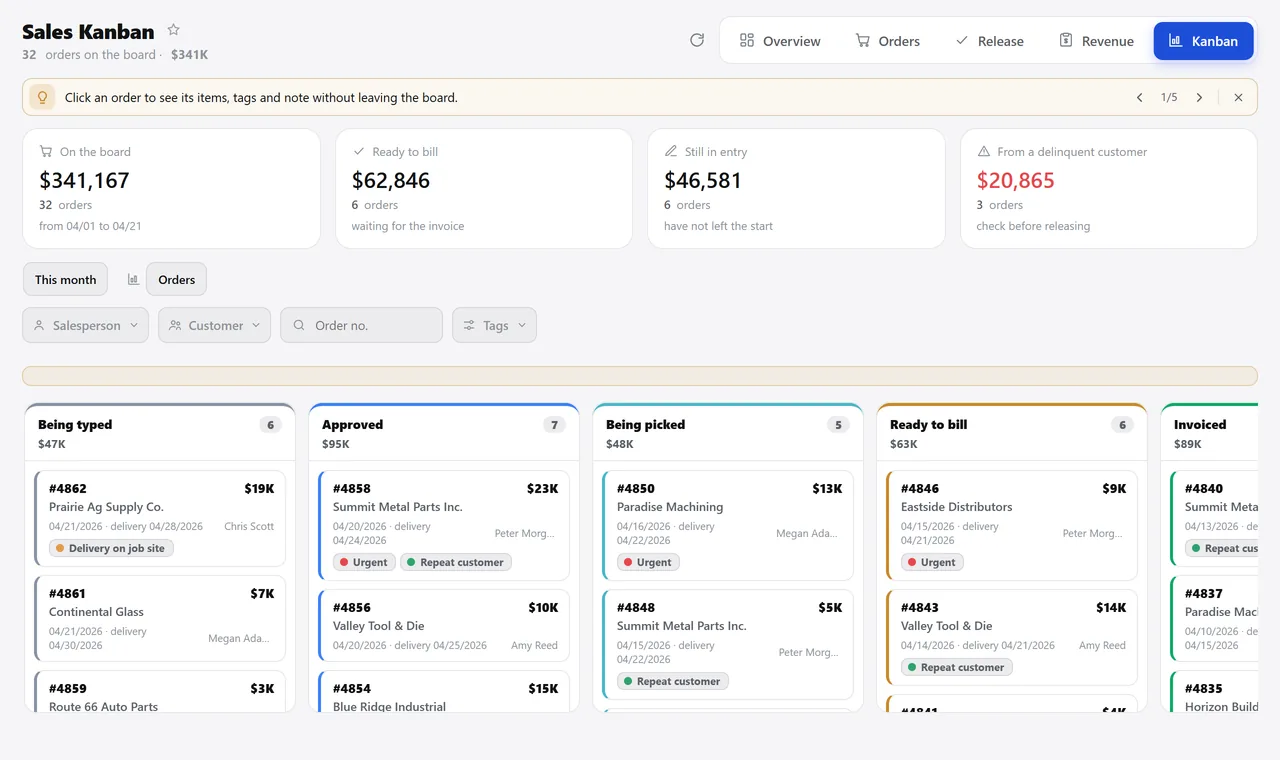
April order kanban: the board total, orders ready to invoice, those still being entered and those from customers with overdue bills, and the columns being entered, approved, picking and ready to invoice.
A real system screen, with sample data. The screens are in Portuguese today.Scroll sideways to see the whole screen.

The order board, the way it looks in the morning. A real system screen, with sample data. The screens are in Portuguese today. Scroll sideways to see the whole screen.

How it usually works

The order lives in four places, and none of them has all of it

“Can we invoice this yet?” becomes a text message, and the stockroom checks each line by hand.

Margin and commission only show up at month end, with costs typed in by hand and returns forgotten.

With the module

One number, from closing the deal to settling the commission

  • The order is created from the approved quote
  • It moves across a board everyone can see
  • The screen tells you what can be invoiced today
  • The rest fills itself in
What you do here, in the order of the day

When the customer says yes

  • Build the order in five steps, or pull in the whole approved quote
  • See right away whether the customer has an overdue bill, before confirming
  • Mark the type: sale, voucher, consignment, trial or loan
  • Record the customer’s PO number, freight, carrier and delivery date

While the order moves along

  • Follow everything on the board, with tags and internal team notes
  • See the backlog: what has been sold and not yet delivered, with inventory alongside
  • Check outgoing goods by scanning barcodes
  • Release for invoicing only what inventory covers — partially, if needed

At month end

  • Commission per salesperson on what was invoiced or on what was collected
  • Margin order by order, flagging anyone below the minimum
  • Detailed revenue with the tax and installments of each invoice
  • Dashboard in presentation mode, to put on the screen at the meeting

Talks to Quotes, Inventory, Invoicing, Finance, CRM, and Targets.

Want to see your order moving across this board?

See the system with my own data

A reply by email within one business day, from a person on our sales team — not a bot.

FAQ

Type your question and press Enter: the answer opens right below, in the list.

Will my salesperson see a colleague’s orders?

No. Each salesperson sees only the orders they sold or orders from customers in their own accounts — the filter runs on the server, so changing the address in the browser doesn’t get around it. Administrators see everything.

Why doesn’t the margin match revenue?

Because they answer two different questions: margin looks at the whole order and revenue looks at the invoice. An order invoiced halfway shows up in full on the margin report. If you need it, there is a mode that follows the invoice.

What happens when the customer returns the goods?

The return is posted as a negative entry and zeroes out that sale in the salesperson’s commission. If a return was posted by mistake, you can undo it without touching the invoice history.

Does someone need to authorize a sale below cost?

If your company wants that, yes: the order locks, the person in charge gets a message saying which items are below cost and by how much, and approves it through a link. Without that set up, no one is interrupted.

Does the Excel export include everything or just what’s on screen?

Excel brings every record in the filter, not just the page that loaded. The PDF has what’s in view, which is what you want for printing and taking to a meeting.

Does it work with a lot of history?

It does. The backlog and lookup screens load in parts and keep the result for a few minutes — that’s how a database with more than a million rows went back to opening in seconds.

See all questions