

CRM
Every lead with an owner, a deadline and a next step — nobody gets forgotten.
See the system with my own data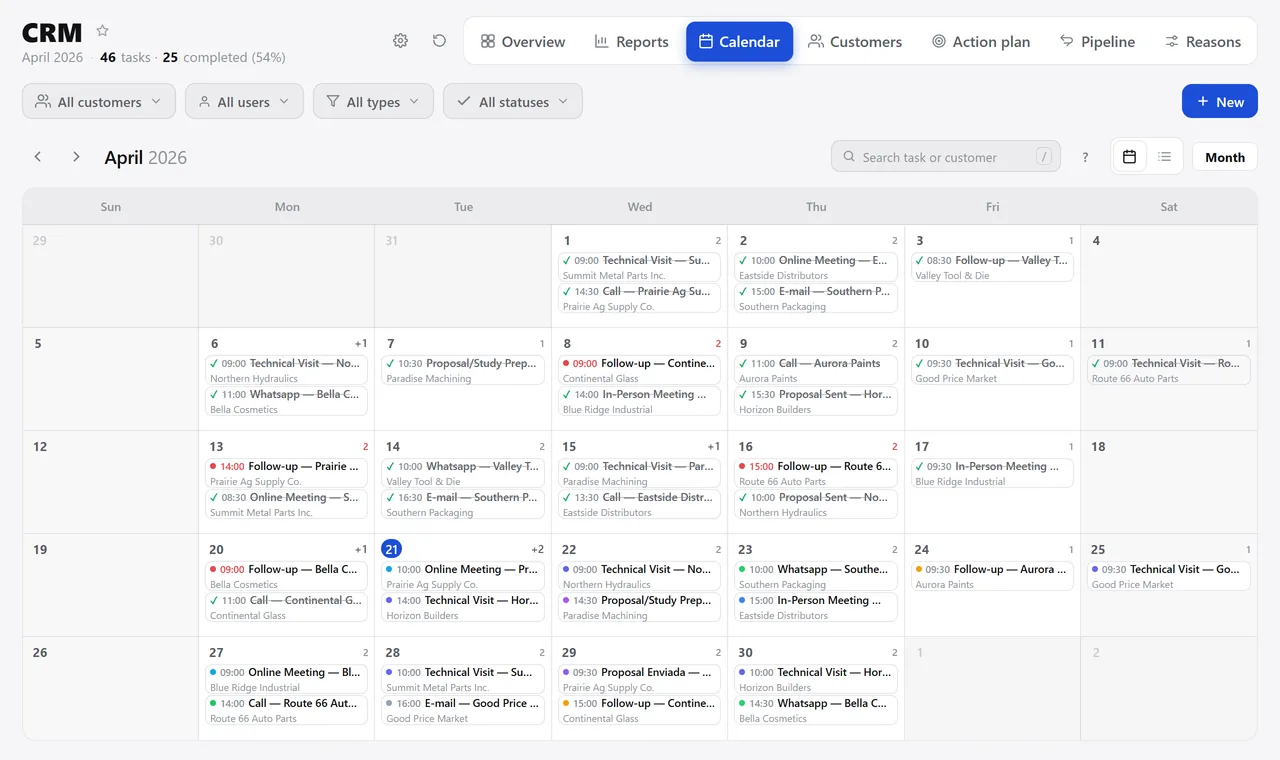
The month’s calendar, with what’s overdue in red. A real system screen, with sample data. The screens are in Portuguese today. Scroll sideways to see the whole screen.
How it usually works
The accounts live in the salesperson’s notebook
The lead that came in through the website lands in an email and gets lost in someone’s inbox.
Finding out that a good customer stopped buying depends on someone comparing two years of spreadsheets.
With the module
The relationship becomes a schedule, and the schedule becomes a number
- The contact comes in from anywhere
- Every conversation sets the next one
- The sent proposal comes in on its own
- The dashboard shows who has gone cold
What the team does here
So no one slips through the cracks
- Drag-and-drop opportunity pipeline, with your company’s stages
- Public form to capture contacts from your website, no login
- Import contacts in bulk from a spreadsheet
- Convert the opportunity into a customer with one click
In a salesperson’s day-to-day
- Monthly calendar with nine types of contact, each in its own color
- Quick customer record without leaving the task being created
- Notes by voice dictation, for anyone out in the field
- The appointment shows up on each participant’s personal calendar
For the manager to decide
- Account activity: how many customers bought in the last six months
- ABC curve showing how many class A customers are inactive
- Drops by product, comparing the same range of months year over year
- Action plan per customer, with a revenue goal and a deadline
Talks to Quotes, Sales, Master Data, Finance, Reports, and Integrations.
How many of your customers haven’t bought in six months?
See the system with my own dataA reply by email within one business day, from a person on our sales team — not a bot.