

Quotes & Proposals
A quote in minutes, with price, lead time and margin calculated on the spot.
See the system with my own data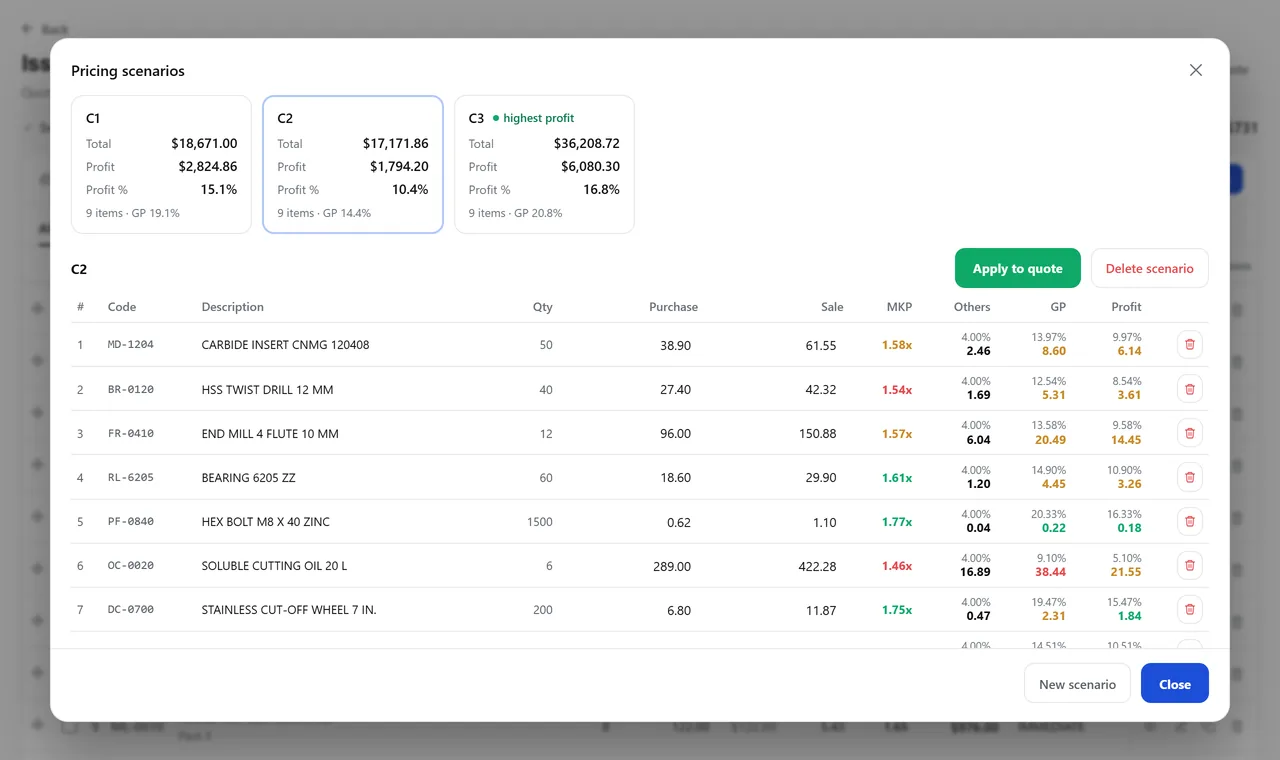
The margin analysis, with the scenarios open. A real system screen, with sample data. The screens are in Portuguese today. Scroll sideways to see the whole screen.
How it usually works
The price is a guess dressed up as a spreadsheet
Each salesperson has their own spreadsheet, and the price comes from a table pasted in from another file.
No one knows how many quotes are still open, or why the customer went quiet.
With the module
Prices with the math done, and the proposal goes out in your own template
- The customer comes in with their history
- Margin shows up line by line
- You simulate without spoiling the quote
- The proposal goes out in your company’s template
What this screen solves
While putting it together
- Find items by code, barcode or loose words from the description
- See the product photo, inventory, supplier inventory and list price
- Delivery date calculated from available stock — including when the quantity is larger
- Your own types: sale, voucher, trial, consignment, loan and sample
When deciding the price
- Markup, gain and profit per item, with taxes already deducted
- Parallel scenarios to compare hypotheses without touching the quote
- Minimum markup lock, so discounts don’t go past your company’s limit
- Approval request to the person in charge when the type requires it
After sending
- Follow-up with the date of the next contact and notes by voice dictation
- Standard loss reasons — price, lead time, terms, purchase postponed
- Conversion dashboard: issued, approved, average ticket and how many became orders
- History of who created, edited, sent and decided each quote
Talks to Sales, CRM, Master Data, Inventory, Finance, and Purchasing.
Want to see the real margin on your latest quote?
See the system with my own dataA reply by email within one business day, from a person on our sales team — not a bot.