
An order comes in. The whole company knows.

Sales, inventory, production, tax and finance in the same system — no retyping and no side spreadsheet.

26 years building ERP · more than 100 companies served

Order #2841Summit Metal Parts
In progress$18,460.00
  1. 08:12QuotesQuote 1207 approved by the customer
  2. 08:12SalesBecame order 2841 without retyping an item
  3. 08:14InventoryReserved 40 bearings in warehouse 1
  4. 10:31InvoicingInvoice 5321 issued from the order
  5. 10:31FinanceThree installments receivable: 30, 60 and 90 days
  6. 10:32TargetsAmy’s target went from 78% to 81%
Simulation with sample data

The same record, seen by each department.
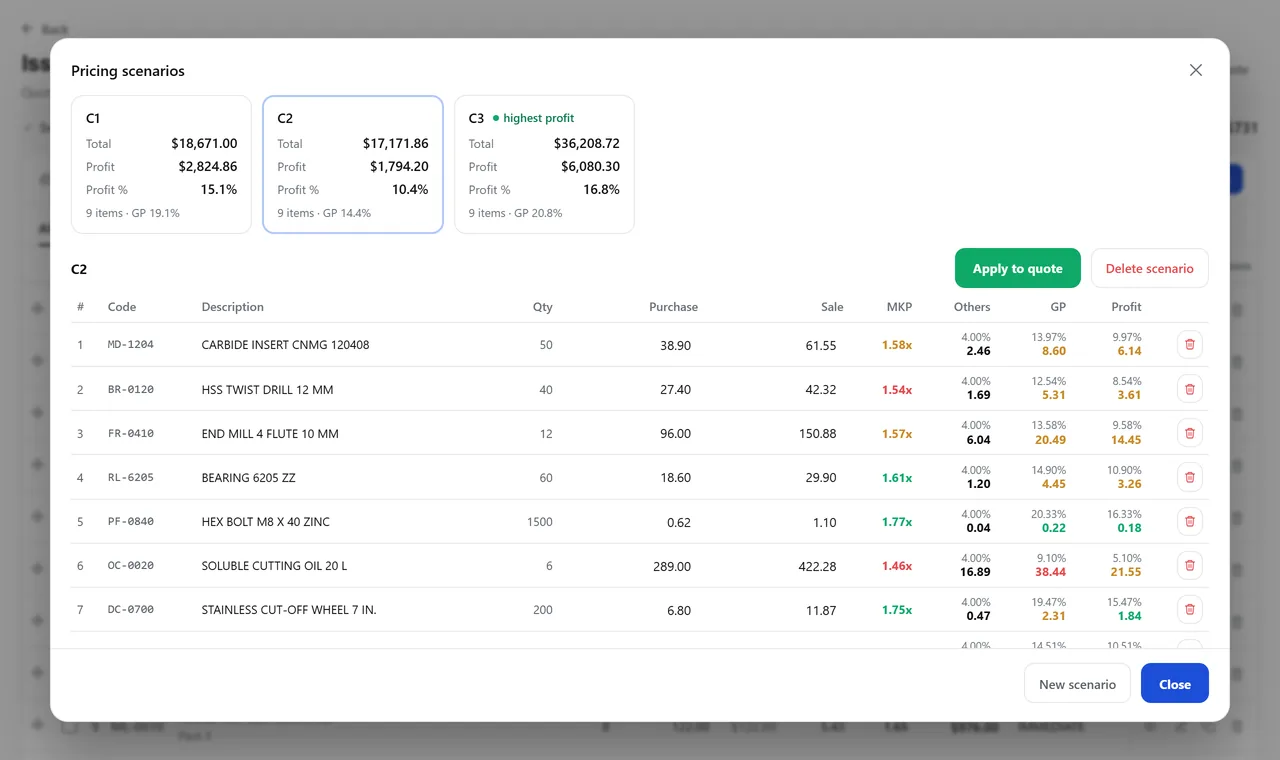
Develop · Quotes · Pricing scenarios
Scenario window for a nine-item quote: three alternatives, each with its total and profit, and the open scenario’s table with purchase, sale, markup, other costs, gross profit and profit per item.
A real system screen, with sample data. The screens are in Portuguese today.Scroll sideways to see the whole screen.

The sales rep builds the proposal with price, lead time and margin calculated on the spot — and compares scenarios before sending it.

Explore the module

Every industry has a detail.

We already know the details of your industry before the first meeting.

There are also versions for dentistry, dental prosthetics lab, medical clinic, optical store, doors and windows and construction.

From the first coffee to the system up and running.

See implementation in detail

The person who answers the phone knows your process.

Meet Develop

Your CRM tasks in your Google Calendar.

Inside the Develop system, each user can connect their own Google account so that CRM tasks and meetings become events in their calendar, with Google’s reminder on their phone. Connecting is optional, can be turned off at any time, and the system only touches the events it created itself.

How we use your Google account

Tell us how your shop works today.

Someone from our sales team walks you through the system with a case of yours, not a canned presentation.

This is where our reply goes.
Only if email doesn’t reach you. We don’t sell it or use it for ads.
Industry and message (optional)

We reply by email within one business day — a person from our sales team, not a bot.

FAQ

Type your question and press Enter: the answer opens right below, in the list.

What is Develop?

An ERP for manufacturers and distributors: sales, inventory, production, invoicing and finance in one system. An order is entered once and every department sees what happened in the others, with no retyping and no side spreadsheets.

What kind of company is it for?

Distribution and wholesale, parts manufacturing, tool & die and machining, oil and fuel, fire protection equipment, farm machinery dealers, cosmetics and retail. There are also versions for dentistry, dental prosthetics labs, medical clinics, optical stores, doors and windows, and construction.

Do I have to buy every module?

No. There are 21 modules on the same records: you turn on the ones you use today and add the others when you need them.

How does implementation work?

In three steps, one after the other: understanding how your company works, configuring the system for that way of working, and staying with you after it goes live. Training is by department, on the screen each person will use.

Do my current records come along?

Yes. Bringing over the data you already have (customers, products, price lists) is part of implementation. First, we list what is duplicated or incomplete, so the data comes in clean.

Who provides support?

Develop’s own team, with no bot on first contact and no outsourcing. You can reach us by email, by phone or with a ticket from inside the system, on business days.

See all questions