

Targets & Rankings
How much is left to hit the target, and who is driving the number.
See the system with my own data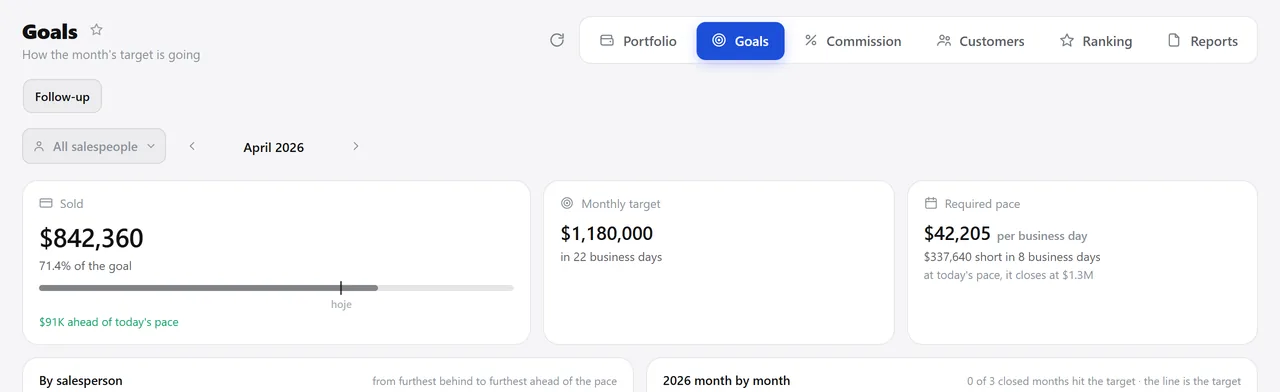
The month’s tracking, on the 21st. A real system screen, with sample data. The screens are in Portuguese today. Scroll sideways to see the whole screen.
How it usually works
The target lives in a spreadsheet only the owner opens
The annual target is divided by twelve, so December gets the same target as February.
The ranking is done by hand once a month, and someone is always missing.
With the module
Set it once a year; follow it every day
- The year’s curve is yours
- The target goes down by salesperson or customer by customer
- Tracking answers the right question
- Actuals arrive on their own
What you can track
Before the year starts
- Seasonality curve on twelve cards, with a live total
- Annual target per salesperson, split automatically along the curve
- Customer-by-customer targets, going through the salesperson’s accounts
- A director who sells can stay out of the team target without leaving revenue
Every day
- Period target × sold, with percentage and a color bar
- Business days left and the pace needed per day
- Month calendar with each day’s sales and the running total
- Target × sales per customer, compared with the same period last year
At the meeting
- Rankings by customer, item, salesperson, product group and month
- Markup and discount given, right inside the ranking
- The code the customer uses for each product, in the item ranking
- A PDF that asks whether you want to hide markup and discount before printing
Talks to Sales, CRM, Reports, and Master Data.
Want to know your ideal pace for today?
See the system with my own dataA reply by email within one business day, from a person on our sales team — not a bot.