
POS — Point of Sale

A register that closes to the cent and flows into finance without passing through a spreadsheet.

See the system with my own data
Develop · POS · Register
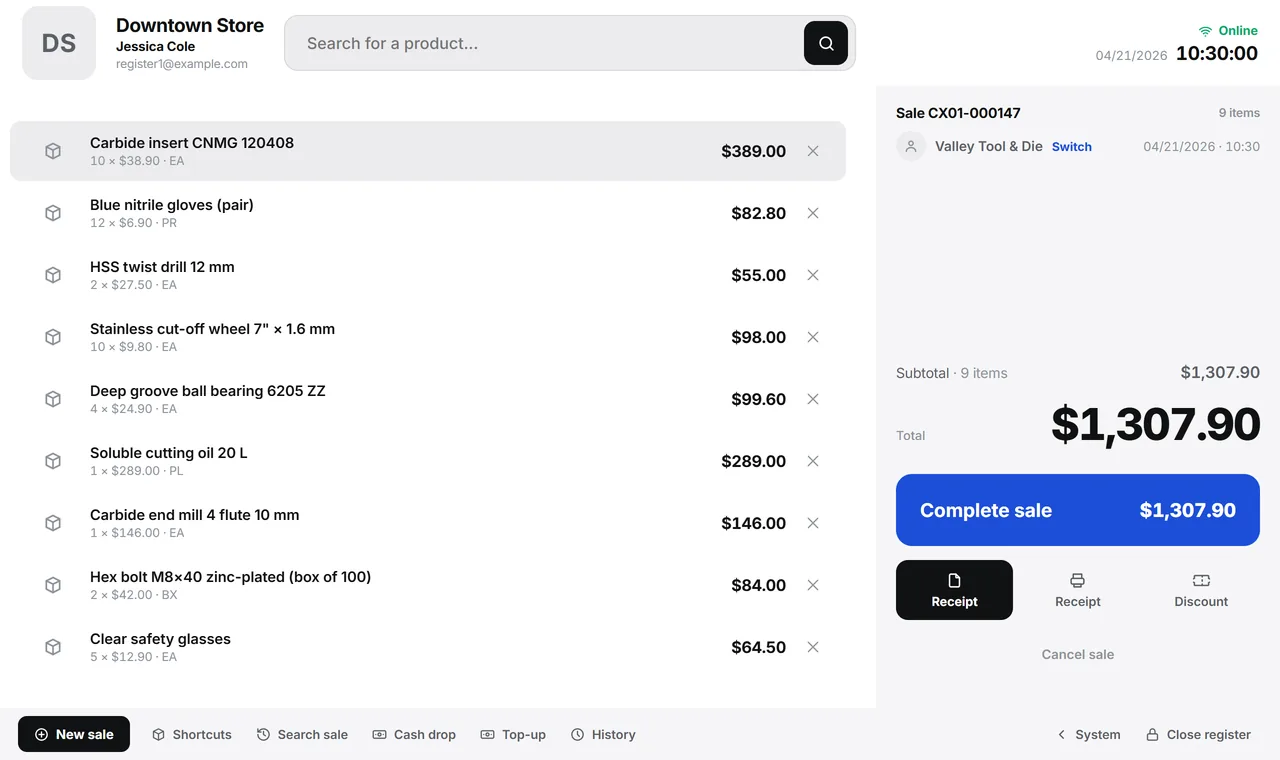
The Downtown Store register with a nine-item sale in progress, the $1,307.90 total, the finish button and the register shortcuts in the bottom bar.
A real system screen, with sample data. The screens are in Portuguese today.Scroll sideways to see the whole screen.

The register in terminal mode. A real system screen, with sample data. The screens are in Portuguese today. Scroll sideways to see the whole screen.

How it usually works

The internet goes down and the store stops

A line at the register, customers walking out, and someone writing sales on a notepad to type in later.

Customer credit lives in a notebook, and the expired coupon is still being accepted.

With the module

The sale is created on the register’s computer, not on the server

  • Open the register in one tap
  • Scan and sell
  • Online or offline, the sale is saved
  • Close by checking each payment method
What the register does

During the sale

  • Scan by barcode, internal code or description
  • A shortcut grid that learns that register’s best sellers
  • Payment split across card, cash, voucher and charge to account
  • Quick customer record without leaving the sale

Controlling the shift

  • Opening with a cash float and closing checked by payment method
  • Cash drops and cash added recorded, with the shift history
  • Cancellation with a reason when the receipt has already been issued
  • Reprint receipts from the sales search

For the store owner

  • Revenue, number of sales and average ticket for the period
  • Peak hours — when the store actually sells
  • Average markup by product group
  • Cashback with rules per store and a real-time simulation

Talks to Inventory, Finance, Invoicing, Master Data, and Reports.

Want to test an internet outage before you buy?

See the system with my own data

A reply by email within one business day, from a person on our sales team — not a bot.

FAQ

Type your question and press Enter: the answer opens right below, in the list.

What if the internet goes down in the middle of a sale?

Nothing changes on screen. The sale is saved on the register’s computer from the start — there is no separate “offline mode” to go wrong. When the connection comes back, the queue uploads on its own, without duplicating.

And the tax receipt — how does it come out?

Tax receipts are country-specific. Today the register issues the ones required where our current customers operate; the US edition, with sales tax, is being prepared with our founding customers. Offline, the sale comes out on a slip, and the receipt follows when it syncs.

Does closing the register work without internet?

Not today: closing requires a connection. An open register keeps selling normally with the internet down — what you can’t do is end the shift offline.

Can two registers sell the last unit?

They can, and inventory may go negative. That’s a deliberate choice: the sale happened at the counter, so it gets recorded — and a discrepancy report comes out so it can be adjusted.

Does a new product show up on the register without internet?

The local catalog grows with use: a product that has never gone through that register can’t be found offline, and the screen tells you so instead of pretending it doesn’t exist.

Can the operator browse the rest of the system?

Not with the register open: the screen becomes a terminal, with no menu and no sidebar. There is an explicit button to go back to the system, and the sale in progress survives.

See all questions