

Master Data
Customers, products and prices in the right place — the foundation for everything that comes after.
See the system with my own data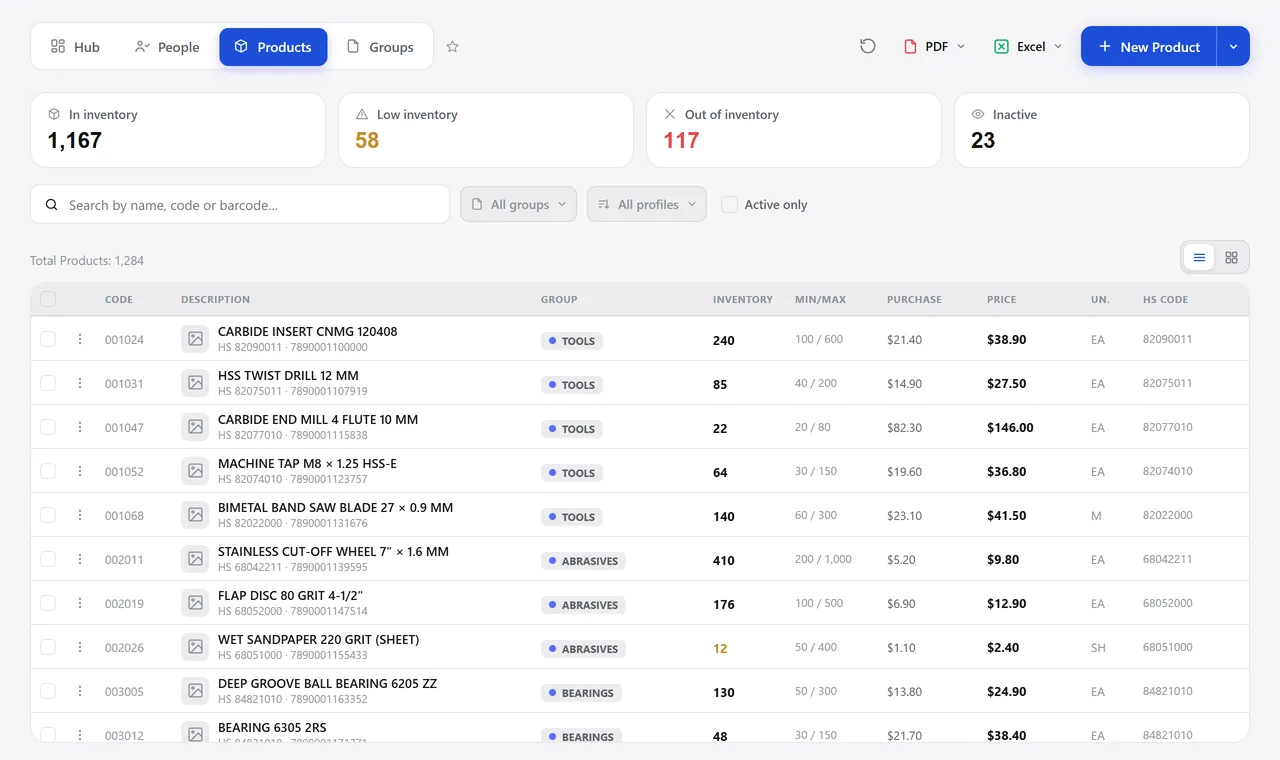
The product lookup. A real system screen, with sample data. The screens are in Portuguese today. Scroll sideways to see the whole screen.
How it usually works
The same customer exists three times, under three names
Each salesperson creates records their own way, and finance doesn’t know which one is right.
Nobody knows the last purchase price of that item, or which supplier it came from.
With the module
The right foundation, and everything else rests on it
- The record keeps the history
- One record serves every role
- The product shows the math as you type
- Bulk price updates, with a preview
What lives here
People
- Customer, supplier, salesperson, carrier, employee and your own company
- Contacts per record, with each one’s phone and email
- Supplier’s default discount, payment terms and account code
- Bank details, which show up on the payment report
Products
- Internal code, external code, barcode and the code the customer uses
- Tax classification, origin, unit and groups
- List price, purchase price and margin calculated live
- Minimum and maximum stock, which trigger the purchase suggestion
Pricing
- Price lists per customer or per profile
- Discount groups recalculating the cost of thousands of items
- The product’s supplier quote history, with the offer that applies today
- Bulk update by spreadsheet, with a report of what didn’t match
Talks to Sales, Quotes, Inventory, Invoicing, and Integrations.
How many duplicate records do you have today?
See the system with my own dataA reply by email within one business day, from a person on our sales team — not a bot.