

Invoicing & Tax Documents
The invoice comes out of the order, with its history kept. The US sales tax edition is in preparation.
See the system with my own data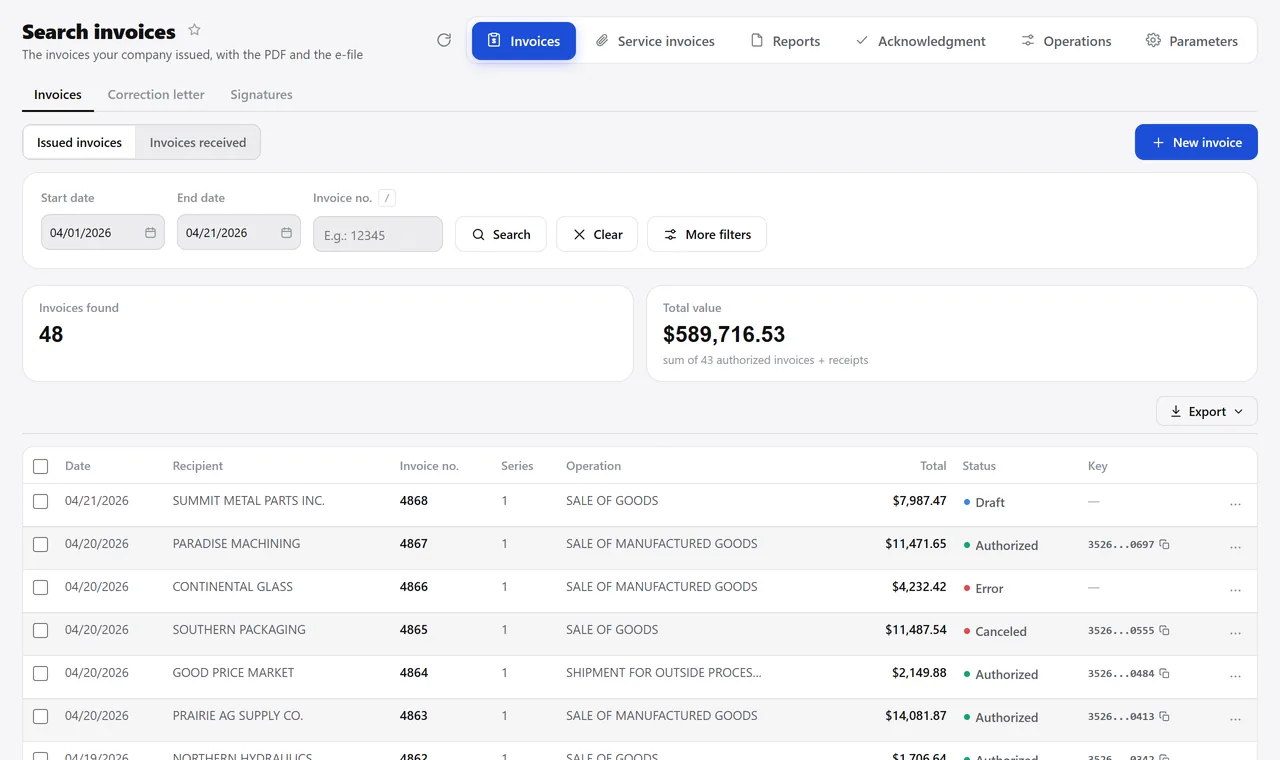
The invoices for the period, with the status of each one. A real system screen, with sample data. The screens are in Portuguese today. Scroll sideways to see the whole screen.
How it usually works
The invoice is typed again, in a separate program
Every day someone checks, one by one, which invoices went out, which were voided and which still need fixing.
At month-end the accountant asks for the invoice files, and someone digs through a folder on the computer.
With the module
Invoicing is the last step of something that was already done
- The invoice pulls in the order
- The tax comes from configuration
- The status answers on the screen
- Once issued, the rest happens
What the invoicing module handles
Outgoing
- Product invoice, from the order or standalone
- Service invoice, from the job or standalone
- Correction of an invoice already issued, kept on record
- Cancellation within the deadline, returning the balance to the order
Incoming
- Invoices received, listed by period with their status
- Service invoice received, creating the payable
- Returns issued and received, with their own report
- The supplier invoice moving on to the stockroom check
For the accountant
- Invoices issued, received and canceled, with totals
- Download every file for the period at once
- Report of customer-owned material sitting at your company
- Tax rates configurable per issuing company
Talks to Sales, Finance, Inventory, Shipping, and Master Data.
Want to see an order of yours become an invoice before deciding?
See the system with my own dataA reply by email within one business day, from a person on our sales team — not a bot.