

Shipping & Logistics
The load leaves checked, the route leaves planned and the delivery receipt comes back signed.
See the system with my own data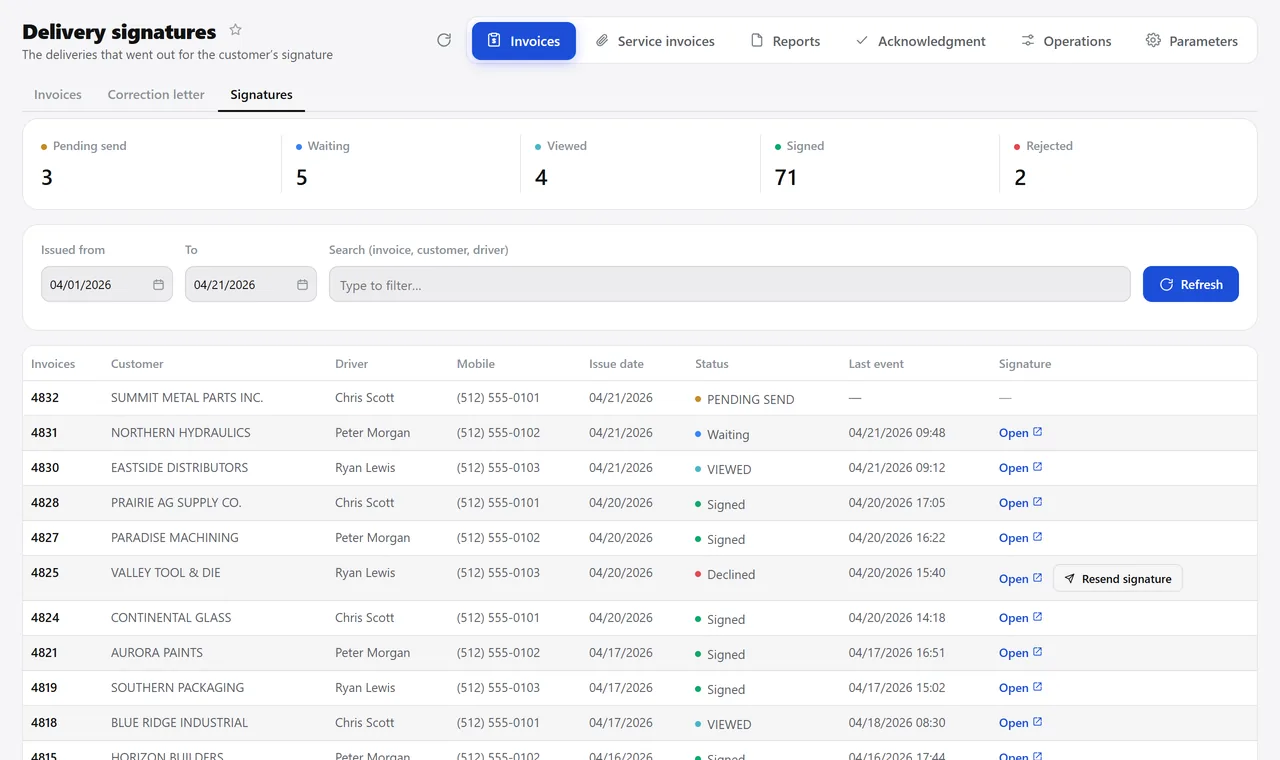
The delivery receipt signed on a phone, invoice by invoice. A real system screen, with sample data. The screens are in Portuguese today. Scroll sideways to see the whole screen.
How it usually works
Proof of delivery is a pile of paper in a box
The driver comes back with a crumpled, undated receipt — nobody knows what time it was delivered or who signed.
An order gets invoiced without stock for every item: the invoice goes out, the goods don’t, and the customer calls.
With the module
It leaves checked and comes back signed
- Before invoicing, the screen tells you what can be invoiced
- The invoice becomes a delivery receipt right away
- The customer signs on their own phone
- The screen shows who signed and who refused
What shipping takes care of
Before the load goes out
- Release for invoicing, item by item, as far as inventory covers
- Barcode check of everything going out
- Gross weight, net weight and volume entered once, and carried onto the invoice
- Final quality inspection releasing the part
At delivery
- Delivery receipt as a PDF, one at a time or in batches, with each issuing company’s logo
- A separate delivery slip when the shipment goes out without an invoice
- Signature through the company’s own messaging account, with automatic status updates
- Record of who delivered, when, and the delivery notes
In planning
- Planning the day’s delivery route on the map
- Pickup release by item, notifying the supplier
- Refusal treated as a final status, with manual resend
- Search by invoice number, regardless of the date range
Want to see a delivery receipt being signed on a phone?
See the system with my own dataA reply by email within one business day, from a person on our sales team — not a bot.