

Purchasing
From purchase request to approved purchase order, with price and lead time chased.
See the system with my own data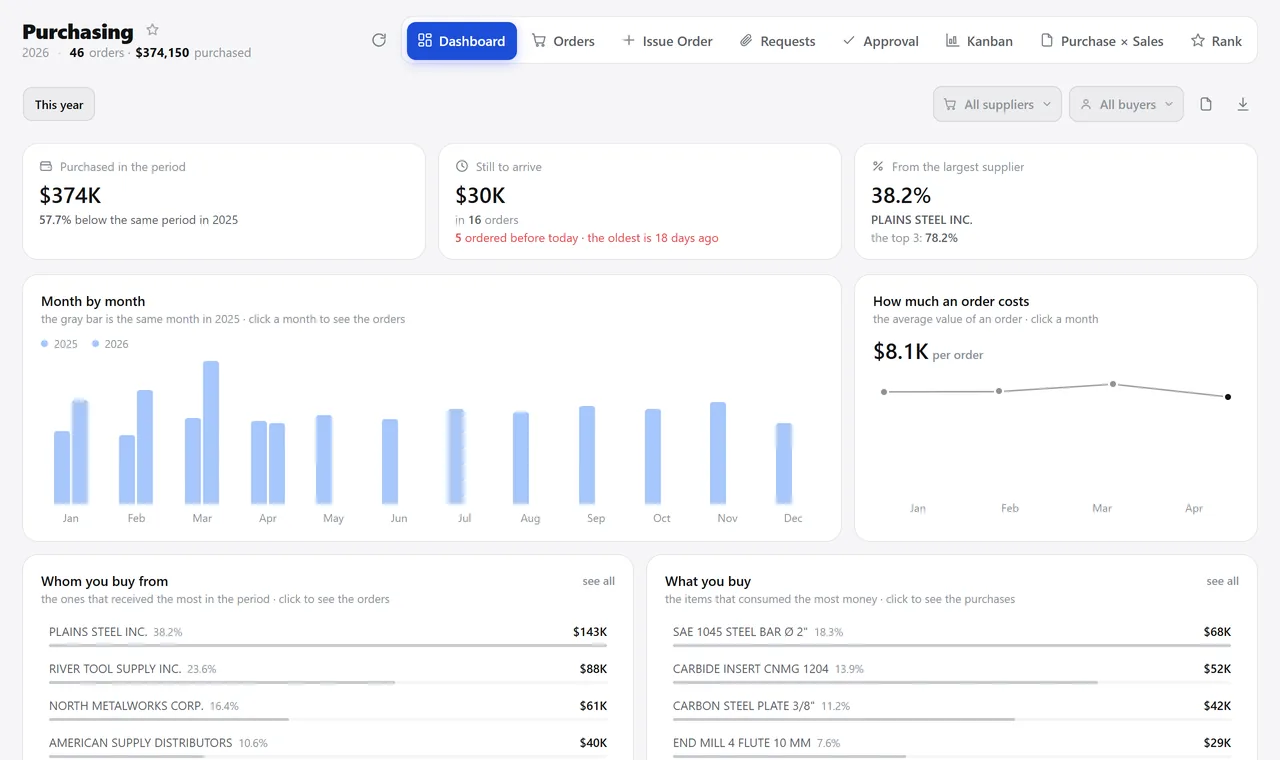
The purchasing overview, the way it opens in the morning. A real system screen, with sample data. The screens are in Portuguese today. Scroll sideways to see the whole screen.
How it usually works
The same thing gets bought three times, and no one knows
The stockroom clerk texts “we’re out of material”; the buyer writes it down in a notebook.
A late purchase only shows up when production stops: there’s no place that says “this order is overdue”.
With the module
From internal request to delivery, with price and lead time held to account
- Whoever needs it, requests it
- The buyer sees the margin before closing
- The order moves across the board
- Whatever was missing goes back to the queue
What the buyer does here
Before buying
- Internal request with items, quantity and destination
- A queue of items to buy fed directly by the sales order
- Suggestions of what to buy based on minimum stock and open orders
- Supplier quotes, with the product’s price history
When closing the deal
- Margin per line and for the whole order, before sending
- Approval by the person in charge, with the order stamped once approved
- Sent to the supplier by email or messaging app, with a copy on record
- Payment terms, chart-of-accounts entry and delivery date on the order
After it’s sent
- A board with your company’s real stages, including pickup release
- Late orders highlighted, with how many days late
- Purchase × sale: what was bought against the sale that triggered it
- Savings per negotiated item and average payment term
Talks to Inventory, Finance, Sales, Projects, Quality, and Production.
How much of your purchasing is late right now?
See the system with my own dataA reply by email within one business day, from a person on our sales team — not a bot.